Back to work
Document IntelligenceDocument AI

Quarry

Invoice and claims extraction that highlights the fields it read — and parks the ones it isn't sure about.

Timeline

10 Weeks

Team

Team of 4

Average handle time per invoice

11m → 90s

Documents posted with zero review

81%

Quarry product interface

Overview

Built for outcomes, not just interfaces.

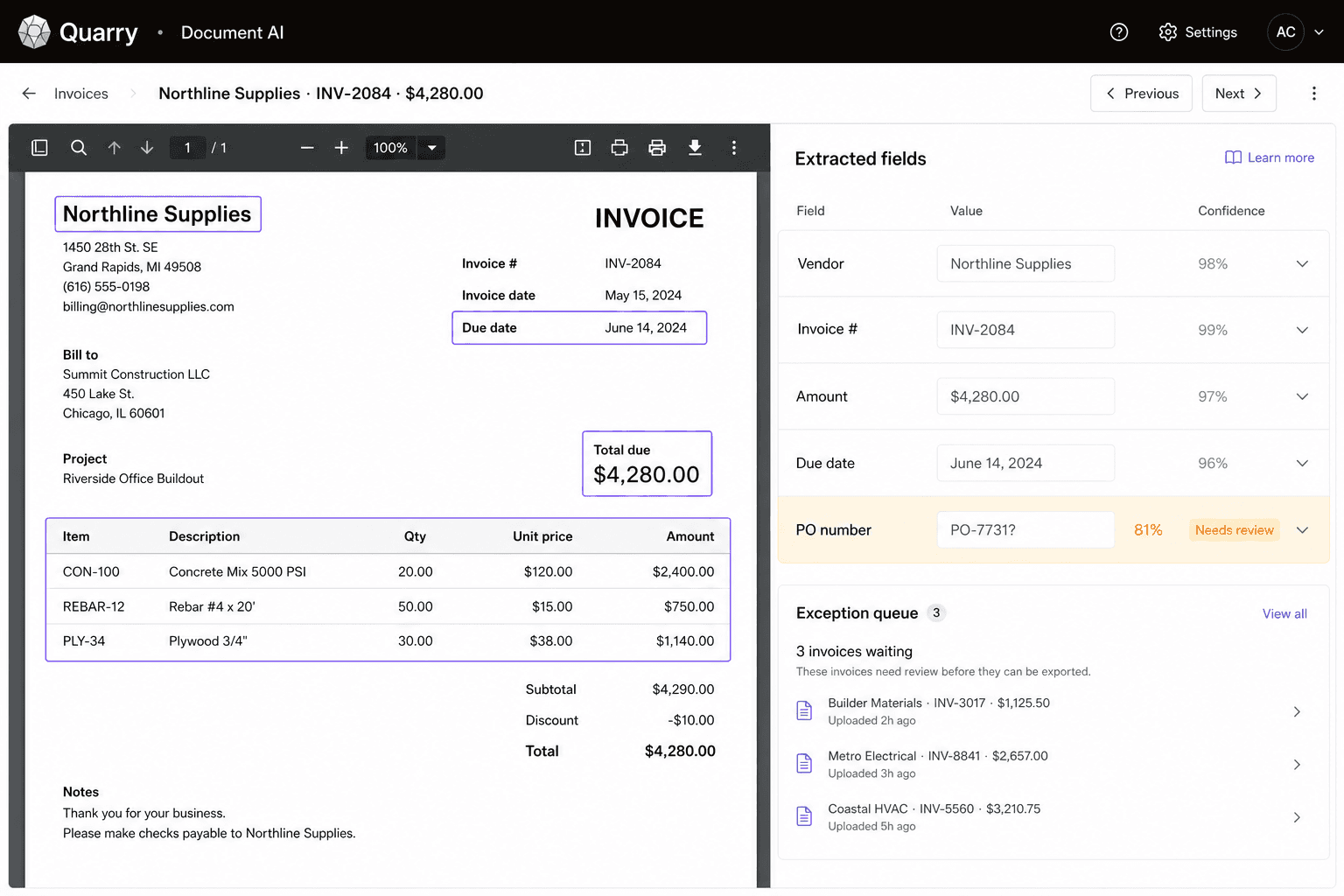
Quarry is a document intelligence system we built for finance and ops teams drowning in PDFs. It extracts vendor, amount, due date, line items, and PO numbers from invoices and claims, writes them into the system of record, and routes low-confidence fields to an exception queue. The UI is the product: you see the document, the highlights, and the extracted fields in one place.

11m → 90s

Average handle time per invoice

81%

Documents posted with zero review

5 → 1

People needed on reconciliation

01 — Challenge

The problem

A multi-entity company had five people reconciling invoices across Stripe, Shopify, and an ERP. Average handle time was 11 minutes per document. Soft declines, missing POs, and vendor-name variants created a weekly exception pile nobody owned. A generic OCR tool dumped text into a spreadsheet and called it done.

02 — Approach

Our strategy

We designed around exception rate, not extraction speed. Fast and wrong is more expensive than slow and reviewed. Every field carries a confidence score. Fields under the threshold stay amber and block posting until a human confirms. The document never leaves the screen while you correct it.

Solution

What we shipped

We delivered a split-pane extractor: PDF on the left with field highlights, structured output on the right, and a persistent exception queue. Confirmed documents post to the ERP and the audit log in one action. Vendor aliases and PO matching improve from corrections without a retraining cycle.

  • Highlight-linked extraction

    Click a field on the right and the box on the PDF lights up

  • Per-field confidence

    Amber rows block posting until someone confirms them

  • Exception queue

    Unresolved documents stay visible — not buried in email

  • ERP writeback

    Posted invoices land in the system of record with an audit trail

  • Correction memory

    Confirmed aliases and PO formats improve the next run

Quarry product detail

Experience

Designed for clarity at every interaction.

Dashboards

The morning view is three numbers: posted overnight, waiting in exceptions, and the field that failed most often this week. Opening an exception jumps to the exact amber field on the document.

User flows

Invoices arrive from email or a drop folder. Quarry extracts, scores, and either posts or queues. A reviewer confirms amber fields in place. Posting is one action — no export, no re-key.

Interactions

Hovering an extracted value outlines the source box on the PDF. Confirming an amber field turns it quiet and advances to the next exception. A posted document gets a persistent receipt ID in the audit strip.

Engineering decision

The hard problem we solved

Challenge

Vendor names and PO formats varied enough that a single model pass kept failing the same 20% of documents.

Decision

We added a correction memory layer: every confirmed alias and PO pattern is stored per vendor and applied before the next extraction. Exception rate on repeat vendors dropped from 19% to 6% in six weeks without a model swap.

Technology

Stack

Next.jsPythonPostgreSQLDocument AIERP APIsS3

Chosen for reliability, speed of iteration, and long-term maintainability.

Takeaway

If your document tool can't show what it read, you still have a data-entry job. We build extractors that leave a trail.

Next case study

Vesper

A phone agent that books, qualifies, and writes the CRM while the call is still happening.

Softqix

Ready to build something that scales?

One focused strategy call. We map the outcome, the scope, and the path — then we build.

Request Cost Estimate
  • Strategy call within 48h
  • No retainer lock-in
  • Clear milestones & pricing